When trying to build the MPOS solution on my laptop, I got the below error.

Error APPX0501 Validation error. error C00CE169: App manifest validation error: The app manifest must be valid as per schema: Line 10, Column 50, Reason: —————‘ violates pattern constraint of ‘(CN|L|O|OU|E|C|S|STREET|T|G|I|SN|DC|SERIALNUMBER|Description|PostalCode|POBox|Phone|X21Address|dnQualifier|(OID\.(0|[1-9][0-9]*)(\.(0|[1-9][0-9]*))+))=(([^,+=”<>#;])+|”.*”)(,((CN|L|O|OU|E|C|S|STREET|T|G|I|SN|DC|SERIALNUMBER|Description|PostalCode|POBox|Phone|X21Address|dnQualifier|(OID\.(0|[1-9][0-9]*)(\.(0|[1-9][0-9]*))+))=(([^,+=”<>#;])+|”.*”)))*’. The attribute ‘Publisher’ with value ————- failed to parse. Pos.App ” 1
App manifest validation error: The app manifest must be valid as per schema: Line 10, Column SO, Reason: ‘xxxx’ violates pattern constraint of ‘(CNILIOIOUIEICISISTREETITIGIIISNIDCI((CNILIOIOUIEICISISTREETITIGIIISNIDCISERIALNUM8ERIDescriptionPostalCodeP080xIPhoneIX21 . The attribute ‘Publisher’ with value ‘xxx’ failed to parse.
It took me a while to figure it out but this was happening because certain features in Visual Studio were not installed, the Retail SDK Handbook helped me to confirm which features were needed to be installed. After installing the highlighted features, I restarted the machine and the solution built successfully.
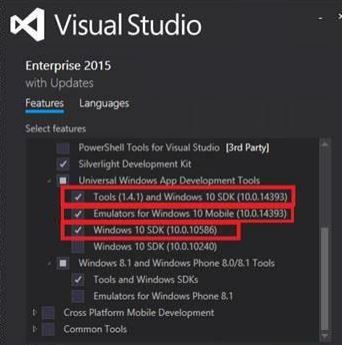
Hope this helps, if someone meets the same error.
-Hitesh Manglani